
halle kody

- Berlin, Germany
- 25. November 2026
Coloring pages: Can several designs share one printed side?
Several coloring pages can sometimes share one printed side while keeping the activity you want. This can be useful when browsing free coloring pages pdf resources and deciding whether selected designs should remain separate or appear together. The decision depends on the drawings and how the sheet will be used. A compact joint view may suit one person, while two people may need independently held pictures. Start with what every design must preserve, then compare a supported combined layout with separate outputs.
1. Keep the wanted regions of every drawing in view
Begin with selected drawings that already interest you. Their individual needs should determine the layout, rather than a desire to fill every part of a sheet. Before you compare sizes, name the parts that make each drawing worth using.
1.1 Name what each selected design must preserve
Imagine a broad leaf drawing and a small garden scene with a winding path. You want the leaf's enclosed sections and the path's narrow bends to remain usable. State that before comparing presentations. The whole leaf might survive a smaller view while the path becomes difficult to distinguish. Check outer edges, internal boundaries, and any narrow regions you want to color. A recognizable subject alone does not prove that all wanted areas remain usable.
Before testing a layout, identify:
- the complete outline that must remain visible;
- one small region that cannot become cramped;
- any internal boundary that needs to stay distinct;
- the way the finished sheet will actually be held or used.
1.2 Treat a small detailed drawing as its own decision
Look especially at the companion that has less room for change. Find one representative small region, such as a turn in the path, and inspect it at the intended result size. Do the lines remain separate? Does a nearby boundary still define the region?
A parent preparing two pages for one child might find that the broad leaf still feels comfortable when reduced, while the narrow garden path becomes cramped. That small observation shows why the two pictures should not be judged by the same reduction rule.
The areas that gave you a reason to choose the design should still support the intended use.

A large leaf sits beside a gently curving garden path
2. Ask whether the uses can share the same face
A clear image can still be inconvenient on a shared sheet. Decide whether the uses themselves belong on the same physical face. This is an important check when working with printable coloring sheets because image quality alone does not tell you whether one combined page will suit the planned activity.
2.1 Use a combined sheet for a genuinely wanted joint view
A positive case is simple: you want a compact view of two drawings and plan to alternate between them yourself. Both remain visible, with enough separation to recognize their regions, and you do not need to handle them independently. A supported joint layout may work well.
The combination is useful because of the activity it enables, not because filling the page is an achievement. Leave blank space if that keeps both pictures comfortable to use.
When considering a joint face, ask whether:
- both drawings can be seen completely;
- the smaller regions remain practical to color;
- the two designs are separated clearly enough;
- one shared sheet still matches the way you want to use them.
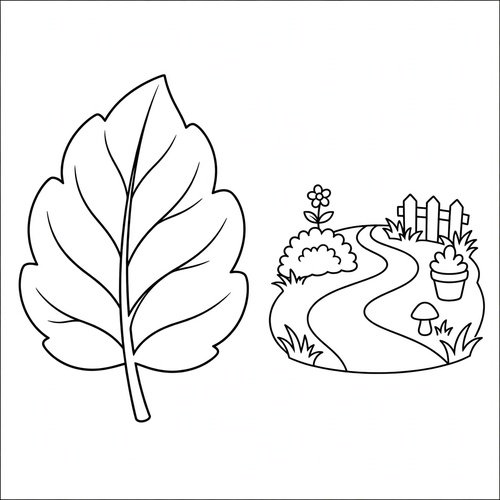
A broad leaf and a winding garden path share one page
2.2 Choose separate sheets for independent handling
Now suppose two people each want to hold and turn their own picture. A legible combined face does not give them that access. Choose separate sheets before optimizing the joint layout.
Imagine two siblings at the same table. One wants to rotate a leaf page while coloring its edge; the other wants to keep a garden page upright. Even if both pictures fit neatly together, sharing one sheet would interfere with both activities. Separate outputs preserve how each person wants to work.
The same applies if one person wants to take a drawing away while another stays.
3. Compare a combined layout with separate outputs
Use only a layout route your actual resources and tools support. Then compare it with keeping each drawing separate. For coloring pages for printing, the key question is whether every design still retains the regions and handling conditions that made it useful.
3.1 Inspect full outlines and separation in an actual supported view
If your viewer or print route offers a suitable arrangement, inspect that supported result. Keep each whole outline inside the usable area and leave clear separation between pictures.
A tall drawing and a wide drawing may not share space as expected. Check the result rather than assume equal boxes create equally useful pictures. The website is not assumed to merge resources or provide a multi-design option. If the route is unclear, keep the resources separate.
3.2 Keep representative small regions usable in every design
Compare the combined view with each drawing at its intended independent size. Return to the narrow path and leaf divisions. Which presentation preserves them?
Screen enlargement cannot establish physical size, so use actual output information where available. A larger companion does not compensate for a smaller drawing losing its purpose. A reduced picture may still work when its wanted regions remain clear. Judge the activity, not equal visual prominence.
Picked For You:
Enjoy Free Printable Coloring Sheets with ColoringPagesCreative
Coloring Pages For Quiet Mornings Filled With Imagination And Joy
4. Let one usable sample decide the remaining preparation
A physical sample is useful when it can settle a remaining question. Inspect it against your requirements before preparing more copies. One sample can reveal whether the combined layout works without creating a permanent rule.
4.1 Inspect the weaker part of the combined result
Start with the weaker part of the combined result. In the hypothetical pair, examine the garden path before the broad leaf. Then inspect the complete outlines and how the sheet will be held.
Does every design still have its wanted role? A sample answers a question about that layout and use; it does not prove all future combinations will work. If an essential feature is missing, identify what failed before changing anything else.
4.2 Retain useful output and prepare only what is still needed
A sample may leave one useful picture and one need unresolved. Keep the useful result, then prepare only the missing independent drawing through a supported route.
Choose separate outputs for both when the joint view has no wanted role. You are not obliged to continue a layout because you tried it once. The comparison still shows which arrangement preserves the selected opportunities.
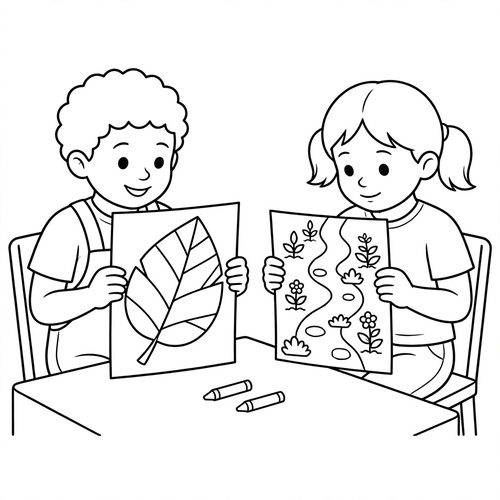
Two kids hold leaf and garden path coloring pages
5. Inspect coloring pages through the actual resources at ColoringPagesCreative
ColoringPagesCreative offers homepage collections and discovery sections for finding coloring pages. Once you select the drawings, open each actual resource and inspect its offered format, any stated paper guidance, and the intended use.
A combined one-face layout depends on the real resources and your print route. This guide does not establish a website merging feature. Keep designs separate if combining them removes wanted regions or prevents the way you plan to use them.
5.1 Open each design through observed homepage routes
Open each selected design through an observed homepage collection or discovery route. Keep the source associated with its recognizable composition so similar previews do not become interchangeable.
The leaf and garden pair is hypothetical, not a claimed set or combined download. Inspect what each resource contains before deciding how to prepare it.
5.2 Check the offered route for the chosen layout decision
Confirm the offered file or print route and the intended use for each drawing. If combining cannot be established or removes a wanted opportunity, choose the clear separate route.
Let the resulting activity settle the one-face decision rather than making claims about universal software features. List what each drawing must keep, compare the combined view with separate outputs, and use one sample when it can settle an essential question. Choose the result that preserves the wanted activity for every design.